


TinyKPI

FREE DIGITAL DOWNLOAD FOR FOUNDERS

Investor update
system.

A simple system for founders who send investor updates: a monthly email, plus tables for your numbers, your asks, and who helped.

Works in Notion, Airtable, Google Docs, Word, and plain text. Free, no signup.

DOWNLOADS

Pick your app.

Each one has the same email, tables, and example.

Notion

Template · Three linked databases

Three linked tables and a dashboard. Runway and growth work themselves out.

Duplicate in Notion
How to use this template

You get a full copy in your own workspace, with the formulas and the MRR chart. The example company is made up.

  1. Open the template and choose Duplicate in the top right corner. Pick your workspace.
  2. Delete the Fieldnote example rows in each database. Keep Blank update.
  3. Each month, duplicate Blank update, add MRR, burn, and cash, and pick the previous update. Write top to bottom and send by the 5th.
Notion help: public pages

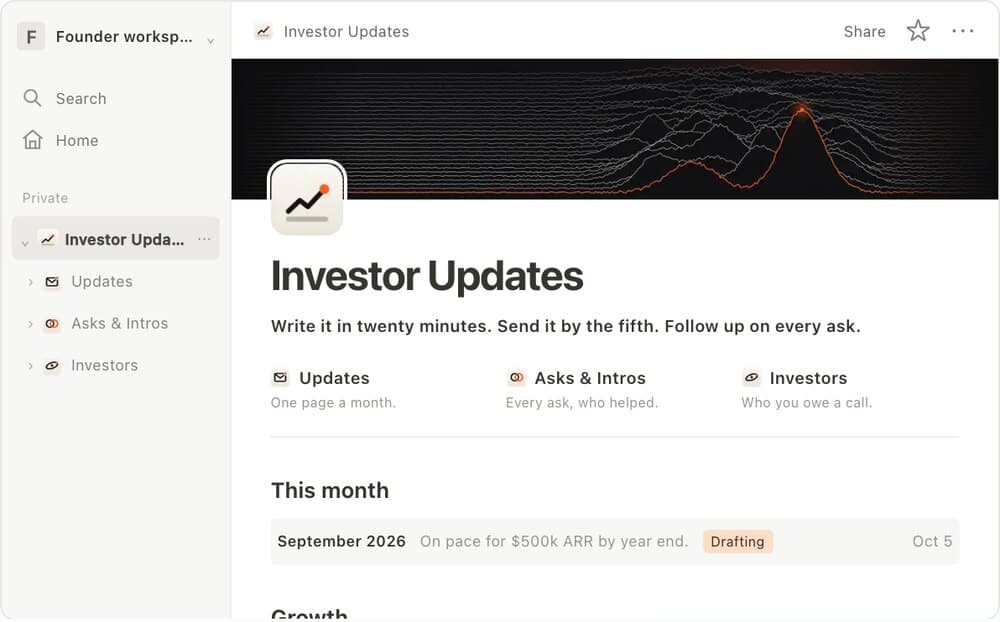
Investor Updates

Write it in twenty minutes. Send it by the fifth. Follow up on every ask.

Updates

One page a month.

Asks & Intros

Every ask, who helped.

Investors

Who you owe a call.

This month
September 2026On pace for $500k ARR by year end.DraftingOct 5
Growth
AprMayJunJulAugSep
Asks in motion
Open1
Warm intros to three seed fundsFundraising
In motion2
Senior backend engineer referralsHiring

Priya Nair

Heads of Ops at logistics companiesCustomers

Daniel Reyes

Home dashboard · Three linked databasesPreview

Airtable

ZIP · Three CSV tables

The same three tables as Notion: updates with their numbers, asks, and investors.

Download
How to use this download

Import the three files into one base. A short guide shows you how to add the links, formulas, and views. It takes about ten minutes.

  1. Unzip the download. Create a base, then import each CSV in Tables as its own table, using the first row as headers.
  2. Follow START HERE to set field types, link the tables, and add the runway, growth, and check in formulas.
  3. Add the saved views. Import the Examples folder into a practice base if you want to see Fieldnote working first.
Airtable import help
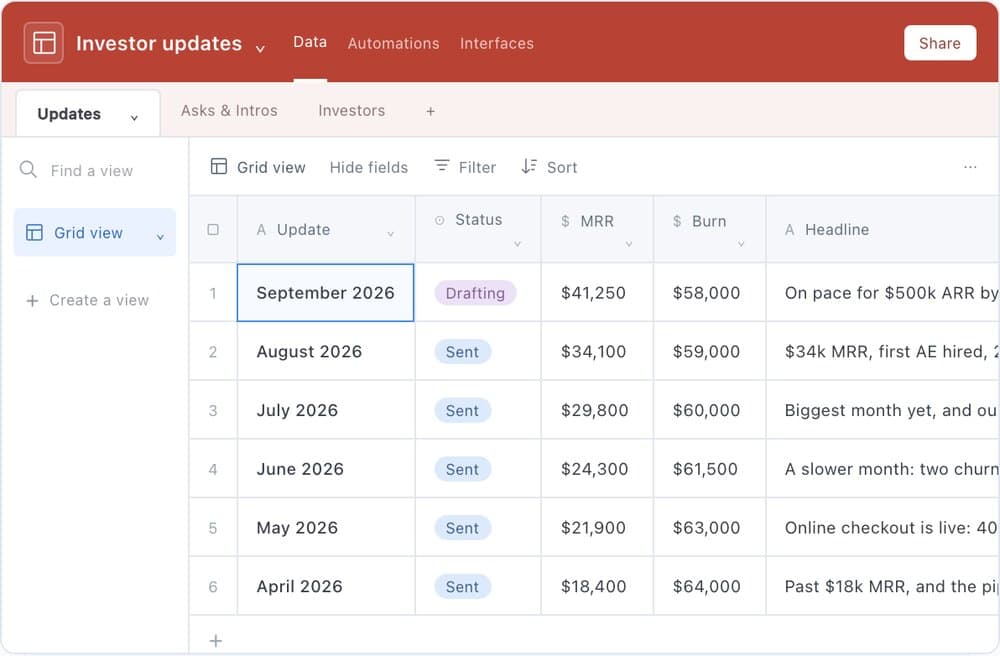
RowUpdateStatusMRRBurnHeadline
1September 2026Drafting$41,250$58,000On pace for $500k ARR by year end.
2August 2026Sent$34,100$59,000$34k MRR, first AE hired, 23 months of runway.
3July 2026Sent$29,800$60,000Biggest month yet, and our first $2k a month customer.
4June 2026Sent$24,300$61,500A slower month: two churned logos, onboarding rebuilt.
5May 2026Sent$21,900$63,000Online checkout is live: 40% of new MRR came without a sales call.
6April 2026Sent$18,400$64,000Past $18k MRR, and the pipeline doubled.
6 records Example data
Updates table · Fieldnote example recordsPreview

Google Docs

ZIP · Two editable documents

One document with the email, the three tables, and an example. Plus a blank email to copy each month.

Download
How to use this download

Upload the DOCX files to Drive and open them with Google Docs.

  1. Unzip the download and upload the two DOCX files to your Google Drive.
  2. Open each with Google Docs. Edit directly or use File → Save as Google Docs to convert it.
  3. Copy the blank email each month. Add a row to Updates, log each ask in Asks & Intros, and keep Investors current. The tables are filled in by hand.
Google Docs file help

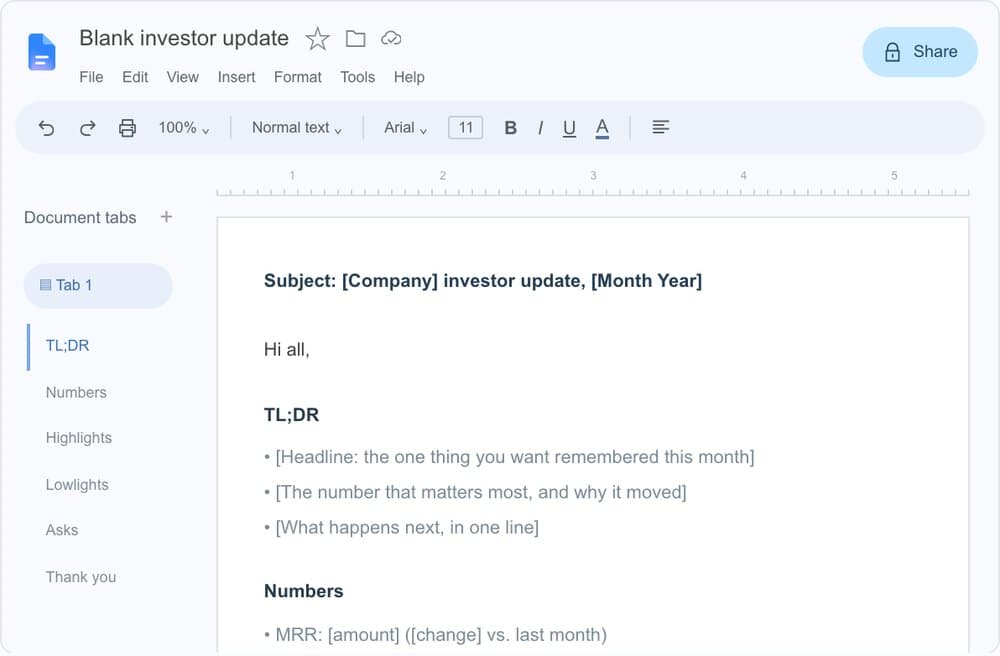
Subject: [Company] investor update, [Month Year]

Hi all,

TL;DR

• [Headline: the one thing you want remembered this month]

• [The number that matters most, and why it moved]

• [What happens next, in one line]

Numbers

• MRR: [amount] ([change] vs. last month)

• Net burn: [amount] a month

• Cash: [amount]

• Runway: [months]

Highlights

• [What went right, with a number attached]

• [A customer, a launch, a hire]

Lowlights

• [What went wrong, and what you're doing about it]

Asks

• [A specific ask: who exactly, why now, and what a great intro looks like]

• [A second ask, if you need one. Keep it to two.]

Thank you

• [Name, for the intro, advice, or hire, and what came of it]

Thanks,
[Name]

Blank email · Editable documentPreview

Word / DOCX

DOCX · Editable document

The email, the three tables, an example, and a short guide, in one document.

Download
How to use this download

Open the document and edit the prompts and tables. No calculations run automatically.

  1. Open the DOCX file in Word or another compatible editor and save your own working copy.
  2. Fill in your company details. Copy the monthly email for each update and add a row to Updates.
  3. Log each ask in Asks & Intros, keep Investors current, and save each sent email as its own file.

02 / UPDATES

One row per month.

Add a row when you close the month.

MonthStatusMRRNet burnRunway
[Month Year][Drafting][Amount][Amount][Months]
Work out the numbers

Runway: cash divided by net burn, in months. Growth: this month’s MRR divided by last month’s, minus one, as a percentage.

Updates · Editable tablePreview

Plain text

ZIP · TXT files

The email and simple records for updates, asks, and investors, as text files.

Download
How to use this download

Open in any text editor. Copy the email into your usual email client.

  1. Unzip the download and open Blank update.txt. It is the same email as the Notion template.
  2. Copy a file from Records whenever you add a month, an ask, or an investor.
  3. Save sent emails in your own Archive folder and note their filenames in each update record.
Blank update.txtPlain text
Subject: [Company] investor update, [Month Year]
 
Hi all,
 
TL;DR
• [Headline: the one thing you want remembered this month]
• [The number that matters most, and why it moved]
• [What happens next, in one line]
 
Numbers
• MRR: [amount] ([change] vs. last month)
• Net burn: [amount] a month
• Cash: [amount]
• Runway: [months]
 
Highlights
• [What went right, with a number attached]
• [A customer, a launch, a hire]
 
Lowlights
• [What went wrong, and what you're doing about it]
 
Asks
• [A specific ask: who exactly, why now, and what a great intro looks like]
• [A second ask, if you need one. Keep it to two.]
 
Thank you
• [Name, for the intro, advice, or hire, and what came of it]
 
Thanks,
[Name]
Blank email · Plain textPreview

Just need the email?

Download .txt

WHAT’S INSIDE

An example month.

Here’s Fieldnote, a made up company, using it. Your copy starts blank.

Made up example

Fieldnote investor update, August 2026

To: Investors & advisors · August 2026

Hi all,

Here's August at Fieldnote, in under three minutes.

TL;DR

  • MRR $34.1k (+14% MoM). Four new mid market teams, zero churn.
  • Our first AE starts September 8. The sales cycle is already down from 41 to 29 days.
  • 23 months of runway at current burn. We're not raising until Q1.
MRR
$34,100 +14.4%
Net burn
$59,000 a month
Cash
$1.37M
Runway
23.2 months

Highlights

  • Kestrel Freight went live at $2.4k a month, now our largest account.
  • Online checkout is 46% of new MRR, up from 40%.
  • Audit log shipped, which unblocked two enterprise security reviews.

Lowlights

  • Onboarding still takes 9 days. Our target is 3. A new import flow ships in October.
  • We lost a deal on price to an incumbent, late in the process. The lesson: we need an annual plan, and it launches next month.

Asks

  • A senior backend engineer. Heavy on Postgres, remote in the EU. If you know someone great who is quietly looking, reply with a name and I'll do the rest.
  • Heads of Ops at logistics companies with 200 to 1,000 people. A 15 minute call to show them what we're building. No pitch deck.

Thank you

  • Maya, for the Kestrel intro. It's now our biggest account.
  • Tom, for an hour on pricing that became our annual plan.

Thanks for being in our corner,
Alex

Every version has the same email and tables.

01

Write the email.

A short summary, your numbers, what went well, what didn’t, two asks, and a thank you.

02

Track your asks.

Note who helped, what came of it, and whether you thanked them.

03

Keep every update.

One row per month, with the numbers and the email you sent.

EACH MONTH

How to use it.

Pick one person to write it and one day to send it. Use the same numbers every month.

Read our guide to writing the email
  1. 01

    Get the numbers first.

    Wait until the month is over. Write down MRR, net burn, and cash, and where each number came from.

  2. 02

    Say what changed, good and bad.

    Start with the main news. Use real details, like a new customer or a missed target. If you don’t know why something happened, say that.

  3. 03

    Ask for something specific.

    Say who you want to meet and why. Add each ask to your asks table so you remember to follow up.

  4. 04

    Save it and follow up.

    Keep a copy of what you sent. Note what came of each ask, and thank the people who helped. Next month, check what you said you would do.

QUESTIONS

Questions.

What’s in the investor update system?

A blank email, a finished example, and three tables: your monthly updates with their numbers, the asks you make, and your investors. Every version has the same parts. The Notion version also works out runway and growth for you.

Is it free?

Yes. You don't need to sign up or give us your email. If you use Notion, Airtable, or Google Docs, you need your own account there.

Does it set itself up?

In Notion, yes. You duplicate it and everything works. In Airtable, you import three files, then follow a short guide to add the links and formulas. The Word, Google Docs, and plain text versions are filled in by hand.

Can I send updates every quarter instead?

Yes. Keep adding a row each month, then write one email for the quarter. Use MRR and cash from the end of the quarter, not the three months added together.

Does it send emails or connect to my bank?

No. You write the email here and send it from your own email. Nothing connects to your accounts.

Want every version in one file?

Download everything
Investor Update System for Founders: Free Digital Download